Svelte
SejHey is a powerful and cost-effective alternative to Crowdin, Phrase, Lokalise, and other i18n platforms.
This library provides a full i18n solution for Svelte applications, allowing you to easily manage translations and support multiple languages. Push translations to SejHey and fetch them dynamically in your Svelte app. Collaborate with your team to manage translations efficiently. Publish changes instantly without redeploying your app.
To learn more about SejHey, visit SejHey Docs.
✨ Features
- Svelte provider via
<SejHeyProvider> - Translation hook
useTranslate - Component-based translation with
<T /> - In-context editing support (even in production)
- Static or CDN-based file loading
- Lazy language loading
- Language picker support
- SSR support with SvelteKit
🚀 Installation
npm install @sejhey/svelte-i18n
🧩 Usage
1. Create an i18n instance
// src/lib/i18n.ts
import { SejheyI18n } from '@sejhey/svelte-i18n'

const en = () => import('../locales/en.json')
const es = () => import('../locales/es.json')

export const i18n = new SejheyI18n({
  defaultLanguage: 'en',
  projectId: 'xxxx-xxxx' // Your SejHey project ID, OPTIONAL, only required for CDN and In-Context Editor
})
  .useCdnLoader() // Fetch translations dynamically from SejHey CDN
  .useInContextEditor() // Enable in-context editing by setting ?in_context=true
  .useLanguagePicker() // Add floating language picker
  .useStaticLoader({ files: { en, es } }) // Fallback static files
2. SSR Support (SvelteKit)
For server-side rendering, use getSejHeyInitialProps in +layout.server.ts:
SejHey provides full support for server-side rendering (SSR) in SvelteKit applications. This enables translations to be fetched and cached on your server during the initial render. This means that users will see the correct translations immediately, without any flickering or loading states.
SejHey also caches translations locally on your server for concurrent request. This is implemented using a SWR (Stale While Revalidate) approach. This means that translations updates are propagated within a few seconds to your application without compromising any caching performance.
// +layout.server.ts
import { getSejHeyInitialProps } from '@sejhey/svelte-i18n'
import type { ServerLoad, ServerLoadEvent } from '@sveltejs/kit'
import { i18n } from './i18n' //Import your i18n instance

export const load: ServerLoad = async (event: ServerLoadEvent) => {
  return await getSejHeyInitialProps(i18n, event)
}
3. Wrap your layout with <SejHeyProvider>
<!-- +layout.svelte (If using svelteKit) or App.svelte  -->

<script lang="ts">
  import { page } from '$app/stores';
  import {  SejHeyProvider } from '@sejhey/svelte-i18n';
  import { i18n } from './i18n';

  let { children } = $props();
  //If using SSR, pass the serialized translations, otherwise omit this prop
  const serialized = $page.data?.serialized;

</script>

<SejHeyProvider {i18n} {serialized}>
  {@render children()}
</SejHeyProvider>
4. Translate text
You can use the useTranslate hook or the <T /> component:
<script lang="ts">
  import { T, useTranslate } from '@sejhey/svelte-i18n';

  let { t, currentLanguage, changeLanguage ,availableLanguages} = useTranslate();
</script>

<h1>

  {/* Provide a default value to fallback on*/}
  {$t('cta.title', {}, 'This is the default title')}

  {/* Same as above but using the component */}
  <T keyName="cta.title" defaultValue="This is the default title" />

</h1>
5. Pluralization and parameters
SejHey supports pluralization and dynamic parameters:
<script lang="ts">
  import { T, useTranslate } from '@sejhey/svelte-i18n';
  let { t } = useTranslate();
</script>

<p>{$t('welcome_message_plural', { count: 1, name: 'Patrik' })}</p>
<T keyName="welcome_message_plural" params={{ count: 1, name: 'Patrik' }} />

<p>{$t('welcome_message_plural', { count: 5, name: 'Anders' })}</p>
<T keyName="welcome_message_plural" params={{ count: 5, name: 'Anders' }} />
6. Change language and listen to changes in language.
<script lang="ts">
  import { useTranslate } from '@sejhey/svelte-i18n';

    let {
    t,
    currentLanguage,
    changeLanguage,
    availableLanguages,
    onLanguageChanged,
  } = useTranslate();

  //Example on how sub-paths can be handled when language changes. This would change the URL path to /es if Spanish is selected and so on.
  onLanguageChanged((lang) => {
    const newUrl = new URL(window.location.href);
    newUrl.pathname = newUrl.pathname.replace(/^\/\w+/, `/${lang.split("_")[0]}`);
    window.history.replaceState({}, "", newUrl);
  });

</script>

<div>

  <p>Current language: {$currentLanguage}</p>

  <button on:click={() => $changeLanguage('es')}>Switch to Spanish</button>

</div>
📦 CDN Loader
The CDN Loader allows you to fetch translations from the SejHey CDN dynamically. This ensures that your translations are always up to date without requiring a full redeploy of your application. Translations from the CDN is hosted using Cloudflare edge servers. This means that they always are delivered with low latency and high availability.
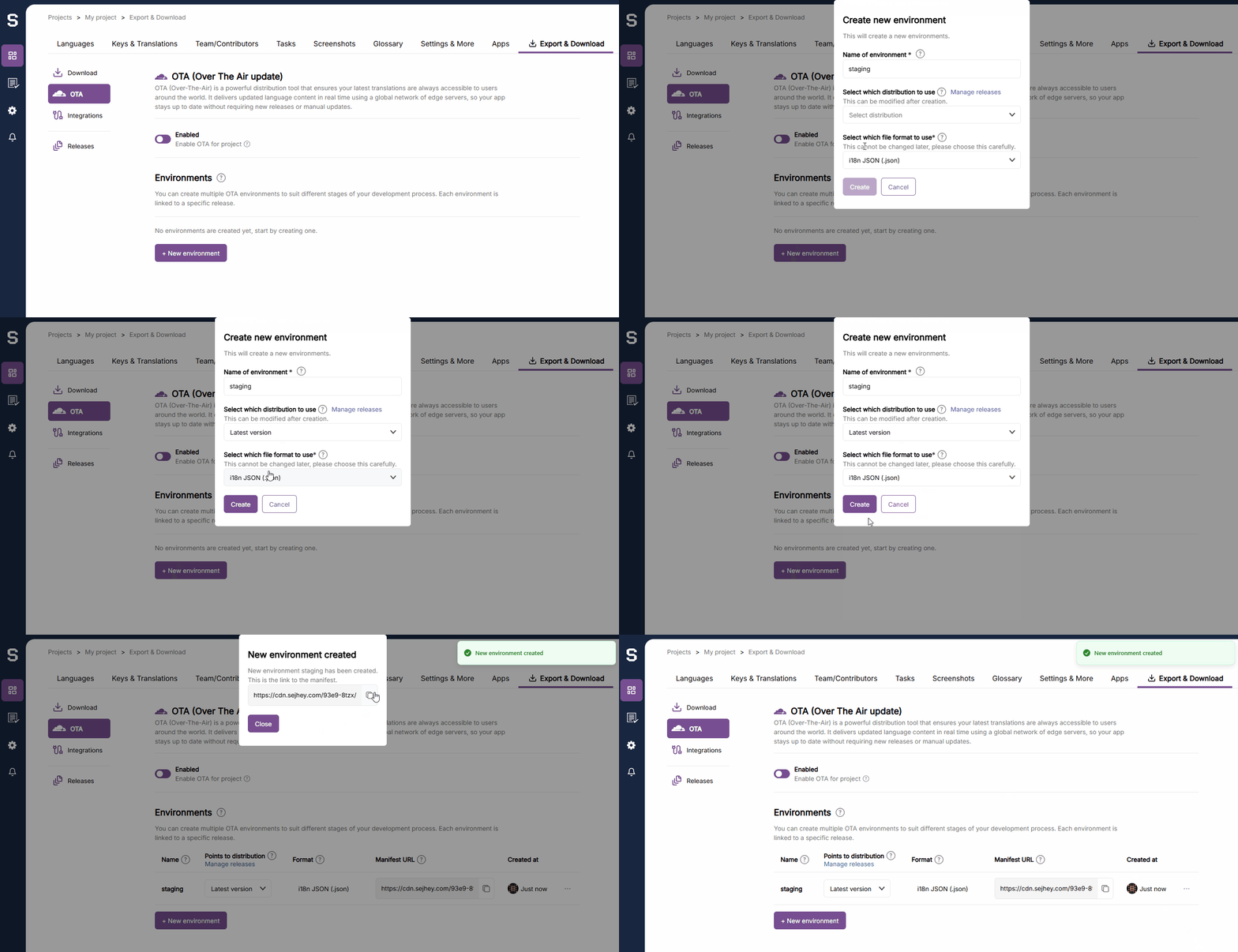
You can set which Environment that the application should point towards. This enables you to have different environments for development, staging, and production. This is set by using the envName option in the CDN loader. Note
const i18n = new SejheyI18n({ defaultLanguage: "en",projectId: 'zbsz-xqjv'})
  .useCdnLoader({envName:'staging'})  // Specific environment. Defined in SejHey dashboard.
To create a new environment, follow this instruction from within the SejHey dashboard. Note that the format must be i18n-JSON.
✏️ In-Context Editor
You easily enable in the in-context editor by adding the .useInContextEditor() in the configuration. This enables in-context editing by adding ?in_context=true to the URL. The in-context editor allow translations to be edited on the web-page directly.
Note: When In-Context is enabled, the translators must still authenticate themselves towards SejHey and translations can only be edited if the user has the appropriate permissions.
You can customize the query parameter to enable in-context by providing your own parameter name:
.useInContextEditor({ enableByQueryParam: 'my_custom_param' })
This would enable in_context by adding ?my_custom_param=true to the URL.
Creating keys
If the logged in user has the appropriate permissions, they can create new translation keys directly from the in-context editor. This allows for a more streamlined workflow, as translators can add missing keys on the fly without needing to switch back to the main application.
Language detection
By default, language detection is enabled in this plugin. The default order is defined as. "querystring","cookie", "localStorage", "path", "subdomain", "htmlTag", "navigator". This can be customized or disabled, see langageDetectionSettings in the API documentation for reference.
🗂 Static Translations File Format
If you provide static translation files, they must follow flat JSON-i18n format, e.g.:
{
  "welcome_message": "Welcome to SejHey!",

  //If params are present
  "greeting_message": "Hello, {{name}}!",

  //If plural use suffix _one, _other etc, and the variable {{count}}
  "welcome_message_plural_one": "You have one message",
  "welcome_message_plural_other": "You have {{count}} messages"

}
If you are exporting files from SejHey, this option format is called i18n JSON.
📘 API Reference: SejheyI18n
new SejheyI18n(config)
Creates a new SejHey i18n instance.
Parameters:
config: DefaultConfigdefaultLanguage(string, required): The initial language to use (e.g.,"en").projectId(string, optional): Your SejHey project ID (found in your SejHey project under Settings & More ->Settings). Only used if you plan to use the CDN loader or In-Context Editor.langageDetectionSettings(LanguageDetectorConfig, optional):detectionOrder?: DetectorAlternative[]— Detection order:"querystring","nextjs","cookie","localStorage","path","subdomain","htmlTag","navigator". You can customize which ways the plugin uses to detect the current language of their choice.queryParamName?: string— Name of query parameter to detect language if querystring is used. Defaults to locale. Eg?locale=de.disable?: boolean— Disable detection entirely.
fallbackSettings(FallbackConfig, optional):show:'key' | 'empty' | 'fallback_language'— What to display if translation is missing.fallbackLanguage?: string— Language to use as fallback.
Chainable Instance Methods
The SejheyI18n instance implements these methods to configure the functionality:
.useCdnLoader(options?: CdnLoaderOptions)
Fetch translations dynamically from SejHey CDN.
options.envName?: string— Environment name (e.g.,"production","staging"). This is defined from the SejHey project underExport & Download -> OTA -> Environments. If not provided, thedefaultenv will be used.
i18n.useCdnLoader({ envName: 'production' });
.useStaticLoader(options: { files: StaticFileLoader })
Define fallback static translations (bundled with your app).
-
files: Object where keys are language codes and values are:- A function returning
Promise<FlatJson>(lazy import) - Or a
Promise<FlatJson>directly.
- A function returning
i18n.useStaticLoader({
  files: {
    en: () => import('../locales/en.json'),
    fr: () => import('../locales/fr.json'),
  }
});
.useInContextEditor(options?: InContextEditorSettings)
Enable in-context editing for translators.
Note: By enabling this, you do not increase the bundle size. This part of the bundle is dynamically loaded only when needed.
enableByQueryParam?: string— Query parameter that activates the editor (e.g.,?in_context=true).
i18n.useInContextEditor({ enableByQueryParam: 'in_context' });
.useLanguagePicker(options?: LanguagePickerSettings)
Automatically render a floating language picker on your site.
position?: 'top-left' | 'top-right' | 'bottom-left' | 'bottom-right'onChangeLanguage?: (lang: string) => voidfixedLocales?: string[]— Restrict available locales.
i18n.useLanguagePicker({ position: 'bottom-right' });
<SejHeyProvider />
Provider to wrap your app.
Props:
i18n(ISejHeyCoreWrapper, required): Instance created vianew SejheyI18n().serialized?: any: Preloaded translations (e.g., from SSR). See more under getSejHeyInitialProps.children: <slot/>: Your app components.suspenseComponent?: SvelteComponent: Optional loading fallback (e.g., spinner) that is shown before translations are loaded.
Example:
<SejHeyProvider i18n={i18n}>
  <App />
</SejHeyProvider>
useTranslate()
React hook returning translation utilities:
Returns:
t(key: string, params?: OptionsParams, defaultValue?: string, context?: string): string— Translation function.changeLanguage(lang: string): void— Change language dynamically.currentLanguage: string— Active language code.availableLanguages: string[]— All available languages.onLanguageChanged(callback: (lang: string) => void): () => void— Register a listener to language changes. Example:
const { t, changeLanguage } = useTranslate();
return <p>{t('welcome_message', { name: 'John' })}</p>;
<T /> Component
JSX component alternative to t() function.
Props:
keyName: string— Translation key.params?: OptionsParams— Dynamic variables{ name: 'John' }.defaultValue?: string— Fallback if missing.
Example:
<T keyName="welcome_message" params={{ name: 'John' }} />
getSejHeyInitialProps(appContext, i18n)
For SSR (Sveltekit), preloads translations on the server.
// +layout.server.ts
import { getSejHeyInitialProps } from '@sejhey/svelte-i18n';
import type { ServerLoad, ServerLoadEvent } from '@sveltejs/kit';
import { i18n } from "./i18n";

 export const load: ServerLoad = async (event:ServerLoadEvent) => {
  return await getSejHeyInitialProps(i18n, event);
};
🔧 Example Usage
Folder structure
If you want to enable custom language paths like /en, /es etc, you can put all your routes inside a [lang] folder. This is optional. Otherwise, you can just put your routes directly under src/routes.
src/
├─ lib/
│  └─ i18n.ts
├─ routes/
│  ├─ +layout.svelte
│  ├─ +layout.server.ts
│  └─ [lang]/
│     └─ +page.svelte
└─ locales/
   ├─ en.json
   └─ es.json
// src/lib/i18n.ts
import { SejheyI18n } from '@sejhey/svelte-i18n'

const en = () => import('../locales/en.json')
const es = () => import('../locales/es.json')

export const i18n = new SejheyI18n({
  defaultLanguage: 'en',
  projectId: 'xxxx-xxxx' // Your SejHey project ID, OPTIONAL, only required for CDN and In-Context Editor
})
  .useCdnLoader({ envName: 'production' })
  .useStaticLoader({ files: { en, es } })
  .useInContextEditor()
  .useLanguagePicker()
Enable SSR support in +layout.server.ts. This is optional, but recommended for better SEO and performance.
// +layout.server.ts
import { getSejHeyInitialProps } from '@sejhey/svelte-i18n';
import type { ServerLoad, ServerLoadEvent } from '@sveltejs/kit';
import { i18n } from "./i18n";

 export const load: ServerLoad = async (event:ServerLoadEvent) => {
  return await getSejHeyInitialProps(i18n, event);
};
The wrapper, this can be in +layout.svelte or App.svelte if not using SvelteKit.
<!-- +layout.svelte -->
<script lang="ts">
		import { page } from "$app/stores";
	import { i18n } from "./i18n";
	import { SejHeyProvider } from "@sejhey/svelte-i18n";

	let { children } = $props();

	// Reactive reference to SSR props, remove if SSR is not used
	const serialized = $derived($page.data?.serialized);
</script>

<SejHeyProvider {i18n} {serialized}>
	{@render children()}
</SejHeyProvider>
Here is an example of a page component using translations:
<!-- src/routes/[lang]/+page.svelte -->
<script lang="ts">
  import { T, useTranslate } from "@sejhey/svelte-i18n";

  let {
    t,
    currentLanguage,
    changeLanguage,
    availableLanguages,
    onLanguageChanged,
  } = useTranslate();

  // You can use this to sync the language with the path if you are using sub-paths like /en/about etc.
  onLanguageChanged((lang) => {
    const newUrl = new URL(window.location.href);
    newUrl.pathname = newUrl.pathname.replace(
      /^\/\w+/,
      `/${lang.split("_")[0]}`,
    );
    window.history.replaceState({}, "", newUrl);
  });

</script>

<h1>
  {$t("cta.title", {}, "This is the default title", "context")}
</h1>

<h2>Current language: {$currentLanguage}</h2>

<button on:click={() => $changeLanguage("es")}>Change to Spanish</button>
<T keyName="cta.title" />
License
This project is licensed under the MIT License.